A proper Minesweeper board, right in your browser
Pick a difficulty, click a tile, and start reading the numbers. That is the whole setup. There is nothing to install and no account to make, and the game loads fast enough to squeeze in a round between two other things.
It plays the way you probably remember it: a mine counter and timer at the top, flags on right-click or long-press, and a first click that never blows up. Your best times stay on your own device.
- Three levels, plus custom boardsBeginner, Intermediate and Expert, or set a board size of your own.
- Safe first clickYour opening move is never a mine.
- Flags and chordingClick a number whose flags already match it and its remaining neighbours open at once.
- Timer, mine counter, local best timesHandy for racing yourself, and nothing leaves your browser.
- Works on touch and keyboardLong-press to flag on a phone, with keyboard shortcuts on a computer.
- Installable and offline-readyBuilt as a Progressive Web App, so it can run without a connection.
Want more room to play?
Open the game on its own page. It is handy on a small screen, or when you want the board without the rest of the site around it.
How to play Minesweeper
-
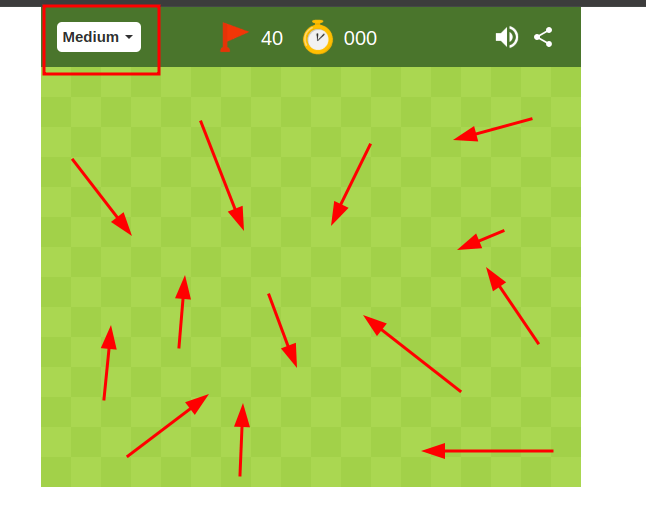
Click any tile to start
Your first click is always safe, and it usually opens a patch of the board so you have something to work with.
-
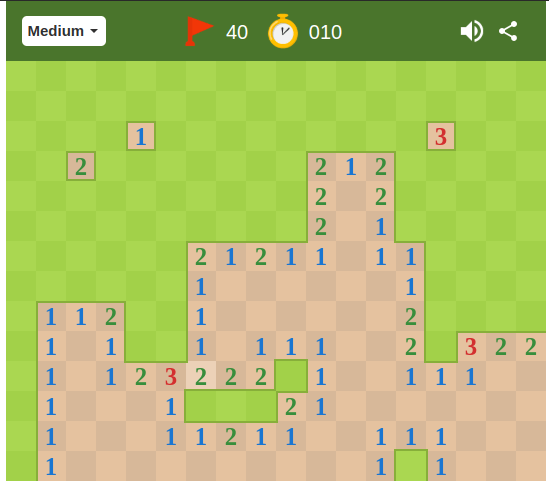
Read what the numbers say
A number tells you how many of the eight surrounding tiles hide a mine. A 1 with only one closed neighbour? That neighbour is a mine.
-
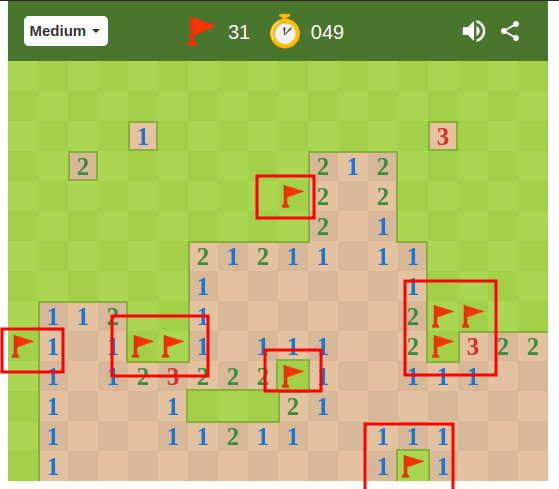
Flag the mines, clear the rest
Right-click, or long-press on a phone, to plant a flag where you are sure there is a mine. Open every tile that is not a mine and you win.
Habits that win games
- Start with the numbers that leave only one possibility, then work outwards from there.
- Only flag a tile when you are sure. A wrong flag misleads you later, especially when chording.
- Keep an eye on the mine counter. It tells you how many mines are still hiding.
- When you have to guess, work out which option is least likely to be a mine instead of going on feel.
Play other games
 Block BreakerPlay Google Block Breaker gamePlay
 Snake gamePlay Google 🐍 SnakePlay
 Block BlastPlace blocks, clear rows, and score points!Play
 PacMan gamePlay the classic Pacman gamePlay
 Dinosaur gamePlay Google 🦕 DinosaurPlay
 2048Play 2048 number gamePlay
 Flappy Bird 2New Flappy bird Two gamePlay
 SudokuSolve a 9x9 Sudoku gridPlay
 SolitairePlay Classic SolitairePlay
 SprunkiUltimate Music GamePlay
Minesweeper, a short guide for people who keep losing on the last tile
Minesweeper looks like a luck game. It is not. Most boards you lose are boards where you clicked a tile you could not actually prove was safe, and most boards you win are won by reading the numbers carefully and staying patient.
Where the game comes from
Mine-hunting puzzles existed on home computers in the 1980s, but the version most of us know shipped with Windows in the early 1990s and landed on millions of office desktops. It stuck because the rules fit on a sticky note and a round takes a few minutes. This page is an independent browser version in that same tradition, built to open instantly on whatever device you have.
Reading the board
Every number counts the mines touching that tile, diagonals included. Start with the easy deductions. A 1 with a single closed neighbour means that neighbour is a mine. A number that already has the right amount of flags around it means every other closed neighbour is safe, so you can open them.
Then learn two patterns. When a 1-2-1 sits in a row with exactly three closed tiles beside it, the mines are under the two 1s and the tile under the 2 is safe. A 1-2-2-1 with four closed tiles puts the mines under the two 2s. Once you spot these, whole sections of the board fall apart quickly.
When you really have to guess
Sometimes the board gives you nothing. Do not click at random. A tile next to a lone 1 with four closed neighbours is roughly a one-in-four risk. An untouched tile far from the action is often safer, and you can estimate it by dividing the mines left on the counter by the number of closed tiles. Pick the lower number.
Playing it here
Warm up on Beginner, move to Intermediate when you stop guessing on your first few moves, and treat Expert as the real test. In the classic Windows version the three levels were 9×9 with 10 mines, 16×16 with 40, and 30×16 with 99. This version follows the same progression, and the custom option lets you set your own board.
Use flags with a right-click or a long press, and try chording once you trust your flags. If you ever want the game on a bigger canvas, the Fullscreen and Open game in new tab buttons are there for that.
Frequently asked questions
What is Google Minesweeper?
It is a free, browser-based version of the classic logic puzzle. You uncover tiles on a grid, use the numbers to work out where the hidden mines are, and try to clear every safe tile without hitting one.
How do you play Minesweeper?
Click a tile to start. Each number shows how many of the eight neighbouring tiles contain a mine. Use those clues to decide which tiles are safe, flag the ones you know are mines, and open every safe tile to win.
Is it free, and do I need to sign up?
It is free, and there is nothing to download or sign up for. Open the page and play.
What difficulty levels are there?
Beginner, Intermediate and Expert, each with a bigger grid and more mines than the last. You can also choose a custom board size.
Is the first click really safe?
Yes. The first tile you open is never a mine, so a round cannot end on your first move.
How do I place a flag on a phone or tablet?
Long-press a tile. On a computer, right-click it.
Does it work offline?
The game is built as a Progressive Web App, so after your first visit you can install it from your browser menu and play without a connection. Support varies a little between browsers.
Are my best times saved?
Best times are stored locally in your browser, so they stay on your device. Clearing your site data will remove them.
Can I play full screen?
Yes. Use the Fullscreen button above the game, or the Open game in new tab button further down the page to get the game in its own window.
What does unblocked mean?
It means the game runs straight in your browser with nothing to install. Some school or work networks still filter websites, and we cannot override that.
Is this an official Google or Microsoft game?
No. It is an independent browser version of the classic puzzle and is not affiliated with, endorsed by, or sponsored by Google or Microsoft.